What Is Enterprise Resource Planning? A Leader's Guide

What Is Enterprise Resource Planning? A Leader’s Guide
TL;DR:
Enterprise resource planning is an integrated software system that connects core business processes into a single platform. It improves real-time decision-making, eliminates data silos, and supports scalable growth for organizations.
Enterprise resource planning (ERP) is defined as an integrated software system that connects core business processes, including finance, HR, supply chain, procurement, and sales, into a single unified platform. ERP serves as the central nervous system of an organization by replacing disconnected spreadsheets and legacy systems with one shared data source. Every department reads from and writes to the same database, so a purchase order in procurement automatically updates inventory, accounting, and cash flow forecasts at the same time. For business leaders, that real-time visibility is the core value proposition. Understanding what ERP is and how it works is the first step toward making a well-informed investment decision.
What is enterprise resource planning and how does it work?
ERP systems operate through a modular, integrated architecture where each functional application, such as accounting, customer relationship management, manufacturing, and payroll, shares a common database. When one module records a transaction, every connected module updates automatically. A sales order entered by the sales team triggers inventory checks, warehouse picks, and an accounts receivable entry without any manual handoff.

This architecture eliminates the coordination overhead that kills efficiency in growing organizations. Without ERP, a finance team might reconcile data from three separate systems at month end. With ERP, that reconciliation happens continuously and automatically.
The most common ERP modules include:
Finance and accounting: General ledger, accounts payable, accounts receivable, and financial reporting
Human resources: Payroll, benefits administration, workforce planning, and compliance tracking
Supply chain management: Procurement, inventory control, demand planning, and logistics
Customer relationship management (CRM): Sales pipelines, customer data, and service history
Manufacturing: Production scheduling, quality control, and bill of materials management
Each module works independently but gains its full power through integration. A manufacturer running finance and supply chain modules together can see exactly how a supplier delay affects cash flow, in real time, without a single spreadsheet.
Pro Tip: Before selecting an ERP system, map every data handoff between your departments. Each manual handoff is a candidate for automation and a direct measure of the efficiency gain ERP will deliver.
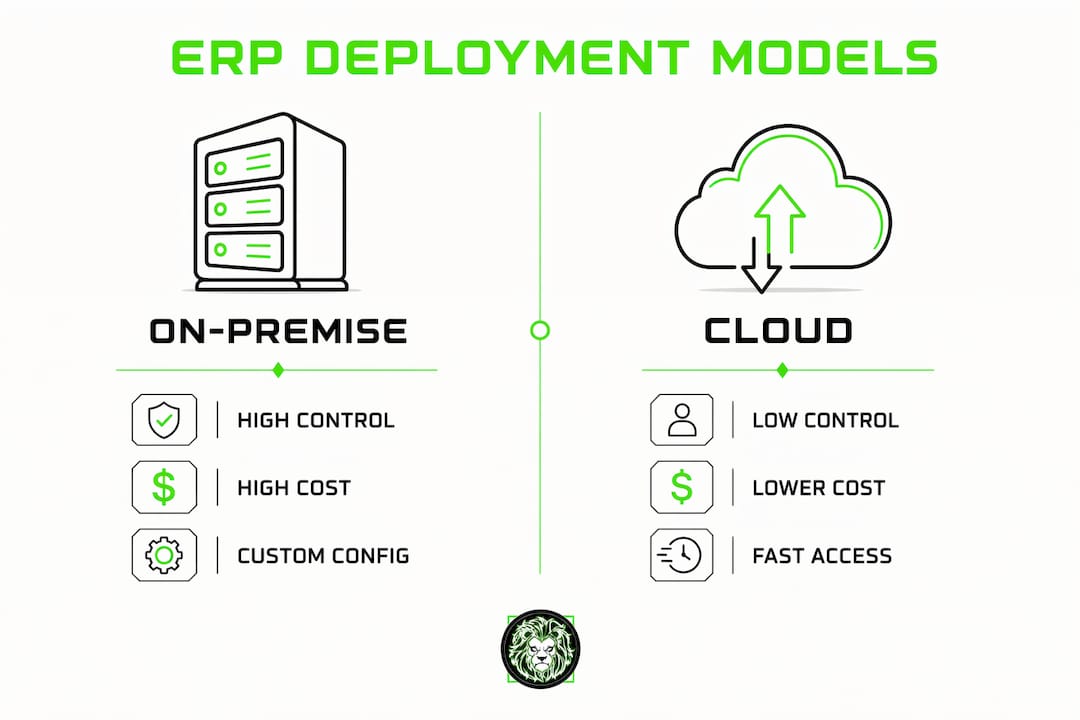
What are the main ERP deployment models?
Three primary deployment models exist for ERP: on-premise, cloud, and hybrid. Each carries different trade-offs in control, cost, and flexibility.
Deployment model | Control level | Upfront cost | Best suited for |
|---|---|---|---|
On-premise | High | High | Regulated industries, complex customization needs |
Cloud | Moderate | Low to moderate | Growing businesses needing speed and flexibility |
Hybrid | Variable | Moderate | Organizations migrating from legacy systems |
On-premise ERP runs on servers your organization owns and manages. You control every configuration and data point. The trade-off is significant infrastructure investment and an internal IT team capable of maintaining the system.
Cloud ERP runs on vendor-managed servers and is accessed through a browser or app. Cloud deployments dominate modern businesses because they reduce setup time and allow teams to work from any location. Updates roll out automatically, which keeps the system current without IT intervention.
Hybrid ERP combines on-premise and cloud components. Organizations often use this model when migrating from a legacy system, keeping sensitive data on-premise while moving less regulated functions to the cloud. It addresses security, compliance, and legacy integration needs simultaneously.
Pro Tip: Cloud ERP is the right default for most organizations starting fresh. Reserve on-premise or hybrid configurations for situations where regulatory requirements or data sovereignty laws make cloud storage genuinely problematic.
What are the key benefits of ERP systems for business leaders?
ERP standardizes and automates core business processes, which produces measurable gains across four areas that matter most to decision-makers.
1. Real-time decision-making
ERP collects inputs from finance, HR, supply chain, and sales into one platform. Leaders can pull a live dashboard showing revenue, headcount costs, and inventory levels at the same moment. That speed replaces the weekly reporting cycle with continuous visibility.
2. Elimination of data silos
Departments that maintain separate systems produce conflicting numbers. ERP cannot unify business data when teams keep their own spreadsheets and metrics. A single shared database forces consistency and makes cross-functional reporting accurate by default.
3. Reduced manual errors
Automated synchronization removes the human error introduced by re-entering data between systems. An invoice that flows automatically from procurement to accounts payable carries no transcription risk. Error reduction directly lowers the cost of corrections and audits.
4. Scalability as the organization grows
ERP systems are built to add modules and users without rebuilding the core architecture. A company that starts with finance and HR modules can add manufacturing or e-commerce modules as the business expands. That modular growth path means the system grows with the organization rather than being replaced by it.
5. Stronger compliance and audit readiness
Every transaction in an ERP system carries a timestamp and user record. Auditors can trace any financial entry back to its source in seconds. For organizations in regulated industries, that audit trail is not a nice feature. It is a legal requirement.
The key driver for ERP adoption in the current decade is enabling real-time performance analytics that support strategic leadership, not just task automation. Leaders who treat ERP as a reporting tool rather than a decision engine leave most of its value unused.
For organizations pairing ERP with advanced analytics, the software data analytics layer built on top of ERP data is where forecasting and competitive intelligence become possible.
What are the biggest ERP implementation challenges?
ERP implementations fail most often because of organizational culture, poor data quality, and scope creep. Each of these is preventable with the right preparation.
Cultural resistance: ERP forces process standardization. Departments that have operated independently for years must adopt shared workflows. Without executive sponsorship and clear communication, teams resist the change and work around the system.
Dirty data: Importing legacy data without cleansing it first corrupts the new system from day one. Duplicate customer records, inconsistent product codes, and outdated vendor information all cause downstream errors that are expensive to fix post-launch.
Scope creep from over-customization: Customizing ERP to replicate outdated processes defeats the purpose of the system. Every custom modification adds cost, extends the timeline, and creates a maintenance burden. ERP projects should drive process reengineering, not preserve legacy workflows.
Underestimating change management: Training is not a one-time event. Users need ongoing support as they adapt to new workflows, and that support requires dedicated resources for months after go-live.
Phased, modular ERP rollouts reduce organizational risk compared to full-scale deployments and allow gradual adaptation. A phased approach also creates early wins that build internal confidence and demonstrate value to skeptical stakeholders.
Pro Tip: Treat data cleansing as a project in its own right before ERP go-live. Assign a data owner for each major data category, such as customers, vendors, and products, and set a quality threshold that must be met before migration begins.
For organizations connecting ERP to mobile workflows, understanding scalable app development is directly relevant to how ERP data reaches field teams and remote users.
Key Takeaways
ERP delivers its full value only when organizations standardize their processes, cleanse their data, and commit to phased adoption rather than attempting a single large-scale deployment.
Point | Details |
|---|---|
ERP definition | ERP integrates finance, HR, supply chain, and sales into one shared database for real-time visibility. |
Deployment choice | Cloud ERP suits most organizations; on-premise or hybrid fits regulated or legacy-heavy environments. |
Top benefit | Real-time analytics replace weekly reporting cycles and support faster strategic decisions. |
Biggest risk | Dirty data and over-customization are the leading causes of ERP implementation failure. |
Best practice | Phased, modular rollouts reduce risk and build organizational confidence before full deployment. |
ERP is a business change, not just a software purchase
I have worked with enough organizations going through ERP projects to say this plainly: the technology is rarely the hard part. The hard part is getting a sales director, a warehouse manager, and a CFO to agree on what a “customer” means in the system. That sounds trivial. It is not.
ERP forces a level of organizational self-examination that most companies avoid. When you implement it correctly, you are not just installing software. You are deciding, often for the first time, exactly how your business operates at a process level. That clarity is genuinely valuable, and it pays dividends long after the go-live date.
The organizations I have seen get the most from ERP are the ones that treated the implementation as a process redesign project with software attached, not the other way around. They used the ERP rollout as the forcing function to eliminate redundant steps, retire shadow spreadsheets, and hold departments accountable to shared data standards.
The ones that struggled tried to replicate their existing mess inside a new system. They spent months customizing the ERP to match workflows that were already broken. The result was an expensive, fragile system that nobody trusted.
My honest recommendation: before you evaluate a single vendor, spend two weeks documenting your current processes end to end. Find every manual handoff, every duplicate data entry, and every report that two departments produce differently. That exercise will tell you more about your ERP readiness than any product demo.
— Amal
How Proud Lion Studios supports ERP and digital integration
Proud Lion Studios builds custom software and integration solutions for organizations that need more than an off-the-shelf ERP configuration. The Dubai-based team specializes in connecting ERP systems with AI automation, blockchain verification layers, and mobile interfaces that extend ERP data to every part of the business.
For organizations exploring how blockchain development can add a tamper-proof audit layer to ERP financial records, Proud Lion Studios designs and deploys those integrations from the ground up. The team also builds CRM and ERP integrations with AI workflows that automate data flows between systems and surface predictive insights for leadership teams. Every solution is built to your specific architecture, not adapted from a template.
FAQ
What does ERP stand for?
ERP stands for enterprise resource planning. The term describes software that integrates core business functions, including finance, HR, supply chain, and sales, into a single unified system.
How is ERP different from accounting software?
Accounting software manages financial transactions only. ERP covers the entire organization, connecting finance with HR, supply chain, manufacturing, and sales in one shared database.
What is the best ERP deployment model for a growing business?
Cloud ERP is the best starting point for most growing businesses. It reduces upfront infrastructure costs, supports remote access, and scales as the organization adds users and modules.
How long does an ERP implementation take?
Implementation timelines vary by organization size and scope. A phased, modular rollout typically takes several months per module, which reduces risk compared to a full simultaneous deployment.
Why do ERP implementations fail?
The leading causes are poor data quality before migration, cultural resistance to process standardization, and scope creep from over-customizing the system to replicate outdated workflows.