90 Day AI for CRM Pilot for Enterprises to Prove Revenue Fast

90 Day AI for CRM Pilot for Enterprises to Prove Revenue Fast
Prioritize AI-driven lead scoring and next-best-action guidance first. It delivers the fastest, most measurable revenue lift of any AI capability inside a CRM, and it sets the foundation for everything else you’ll build. Gartner expects 40% of enterprise apps to carry task-specific AI agents by 2026, and some technology firms are already building that connective layer between AI models and existing CRM data.
TL;DR:
Most successful AI CRM initiatives focus on lead scoring and next-best-action guidance, which offer measurable improvements in conversion rates and sales cycle reduction.
Proper data preparation, including deduplication, establishing canonical IDs, and mapping unstructured data, is essential to prevent early implementation failures.
Launch pilots with clear success metrics, limited scope, and designated owners for model performance and change management to ensure the project stays on track.
Governance practices like data minimization, role-based access, and output review workflows are critical to preventing legal and operational risks.
Continuous monitoring and retraining costs are ongoing commitments; starting small and iterating helps avoid costly mistakes and supports long-term success.
Table of Contents
What AI Actually Does Inside a CRM
What Should You Measure to Prove ROI?
How Do You Prepare for Implementation Without Getting Burned?
Responsible AI and Governance: A Practical Checklist
A 90-Day Pilot: Step-by-Step Roadmap
Trade-Offs We’ve Learned From Real AI CRM Projects
How Proud Lion Studios Can Help You Build This
Sources
FAQ
What AI Actually Does Inside a CRM
AI turns a CRM from a system of record into a system of judgment. It doesn’t just store what happened. It tells your team what’s likely to happen next and what to do about it. Here’s what that looks like in practice, broken down by capability:
Predictive lead scoring ranks prospects by likelihood to close, so reps spend time on the accounts most likely to convert rather than working a list in the order it arrived.
Sales forecasting models pipeline data against historical patterns, flagging deals at risk of slipping before a manager has to ask why the quarter looks soft.
Conversation intelligence summarizes calls and emails automatically, extracting sentiment and objections so managers can coach without listening to every recording.
Generative writing tools draft follow-up emails, proposal language, and account summaries, cutting the administrative drag that eats into actual selling time.
Automated routing and agentic workflows assign leads, escalate tickets, and trigger next steps without a human deciding each handoff.
Chatbots and virtual agents handle first-line service and qualification, freeing human reps for conversations that need judgment.
Anomaly detection catches unusual patterns, like a sudden drop in usage from a key account, before churn becomes a surprise.
Architecturally, you’re choosing between three paths: bolting AI features onto a CRM that wasn’t built for them, adopting an AI-native platform designed around models from the ground up, or integrating your own AI models into whatever CRM you already run. Each has trade-offs in cost, flexibility, and speed to value, and the broader market is converging on unified data paired with embedded predictive and generative features as the baseline expectation, not a premium add-on.
What Should You Measure to Prove ROI?
The benefits are real, but they only matter if you can show them on a dashboard. Teams that deploy AI CRM capabilities well tend to see gains across five areas: higher conversion rates on scored leads, shorter sales cycles, more deals closed per rep, faster service resolution times, and improved retention from proactive account monitoring.
Track these KPIs from day one of any pilot:
Conversion rate on AI-scored leads versus unscored leads
Average sales cycle length, measured in days from first touch to close
Deals closed per rep, before and after rollout
Time saved per task (email drafting, call summarization, data entry)
NPS or CSAT shifts tied to AI-assisted service interactions
Churn and retention movement, plus any change in customer lifetime value
Statistic Callout: IBM reports that 78% of executives plan to scale generative AI within their CRM operations, yet most still lack consistent review processes for the outputs those systems generate. That gap between ambition and governance is exactly where pilots go sideways.
Academic research on AI-powered CRM capabilities backs this up: the firms that see strategic advantage are the ones that align AI investment with existing data management and multichannel integration strength, not the ones chasing the flashiest feature.
How Do You Prepare for Implementation Without Getting Burned?
Most AI CRM failures trace back to data, not models. Before you sign anything, run through this readiness checklist:
Dedupe your records. Duplicate contacts and accounts confuse predictive models before they ever get a fair shot.
Establish canonical IDs. Every customer, opportunity, and product needs one consistent identifier across systems.
Enrich sparse records. Firmographic and behavioral data gaps quietly cap model accuracy.
Map unstructured data. Call transcripts, support tickets, and emails need a path into structured fields the model can use.
Set retention rules. Decide what data ages out and when, before a regulator or a customer asks.
Integration maturity matters just as much. Check your API’s flexibility, whether you need middleware to bridge legacy systems, and if your CRM supports event streaming for real-time triggers. Voice and chat connectors, along with clean CRM-to-ERP sync, determine whether your AI features see the full picture or a partial one.
Operationally, build human-in-the-loop review into any generative workflow from the start. Guardrails aren’t optional once a model is drafting customer-facing text. Set a governance cadence, monitor for drift, and decide who owns model performance long after the launch excitement fades.
Pro Tip: Budget for a scoped pilot (a single use case, a handful of teams, a 90-day window) before committing to an enterprise-wide rollout. It’s far cheaper to discover a data problem in month one of a pilot than in month six of a full deployment.
Cost and timeline vary enormously by scope, but a focused pilot on one workflow, like lead scoring for a single sales team, runs a fraction of the time and budget of a full CRM-wide AI overhaul. Watch for lock-in, too: proprietary model formats and non-portable data pipelines can make switching providers later far more expensive than it should be.
Responsible AI and Governance: A Practical Checklist
Governance isn’t a compliance afterthought. It’s what keeps an AI CRM deployment from becoming a liability the first time a model hallucinates a customer commitment or a data leak traces back to an overly permissive integration.
At minimum, build in:
Data minimization, so models only access what they genuinely need
Consent transparency for any customer-facing AI interaction
Scoped access controls tied to role, not blanket system permissions
Audit logs for every automated decision that touches a customer record
Output review workflows before generative content reaches a customer
Monitoring matters as much as the initial setup. Establish baseline KPIs before launch, sample outputs regularly, watch for model drift as your data shifts over time, and set a retraining cadence rather than waiting for performance to visibly degrade. Encryption in transit and at rest, plus clear controls over any third-party model provider, round out the security baseline.
Proud Lion Studios builds CRM and ERP integration with AI workflows specifically around this kind of layered control, pairing AI agents with the audit and access structures enterprise clients require. The goal is never a model running loose in your customer data. It’s a model working inside boundaries you set and can verify.
A 90-Day Pilot: Step-by-Step Roadmap
You don’t need a year-long transformation program to know if AI CRM works for your business. You need 90 days and a tightly scoped use case.
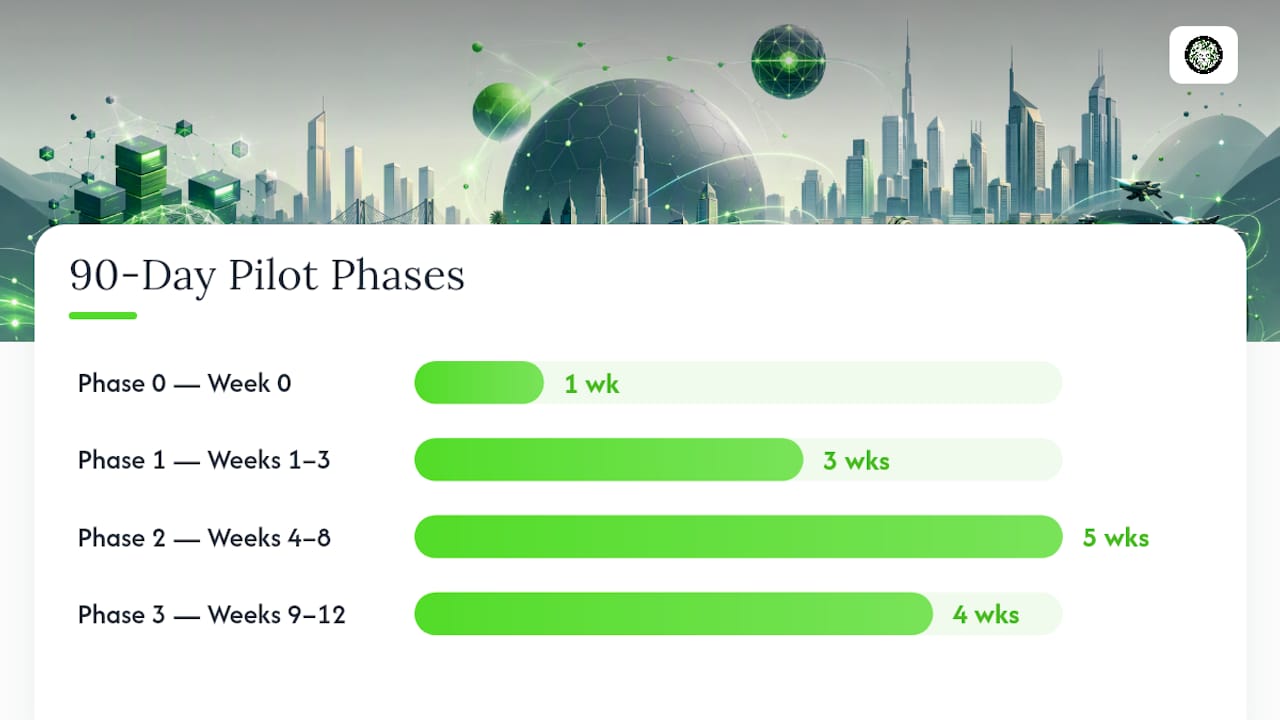
Week 0, Phase 0: Pick one use case, such as lead scoring for a single sales segment, and define success metrics before writing a line of code.
Weeks 1 through 3, Phase 1: Run data discovery. Identify gaps, dedupe records, and look for quick wins that build internal confidence early.
Weeks 4 through 8, Phase 2: Handle integration and model configuration. This is where API maturity and canonical data structure either save you time or cost it.
Weeks 9 through 12, Phase 3: Validate results, train your team on the new workflow, and run a soft launch with a limited group before wider rollout.
Set go/no-go criteria before you start, not after: a minimum lift in conversion rate, a maximum acceptable error rate in scoring, and a rep adoption threshold. If the pilot misses on all three, that’s a signal to adjust scope, not scrap the idea.
Pro Tip: Assign one owner for model performance and one owner for change management. Splitting technical and human adoption between the same overloaded person is the most common way pilots stall in week 6.
Trade-Offs We’ve Learned From Real AI CRM Projects
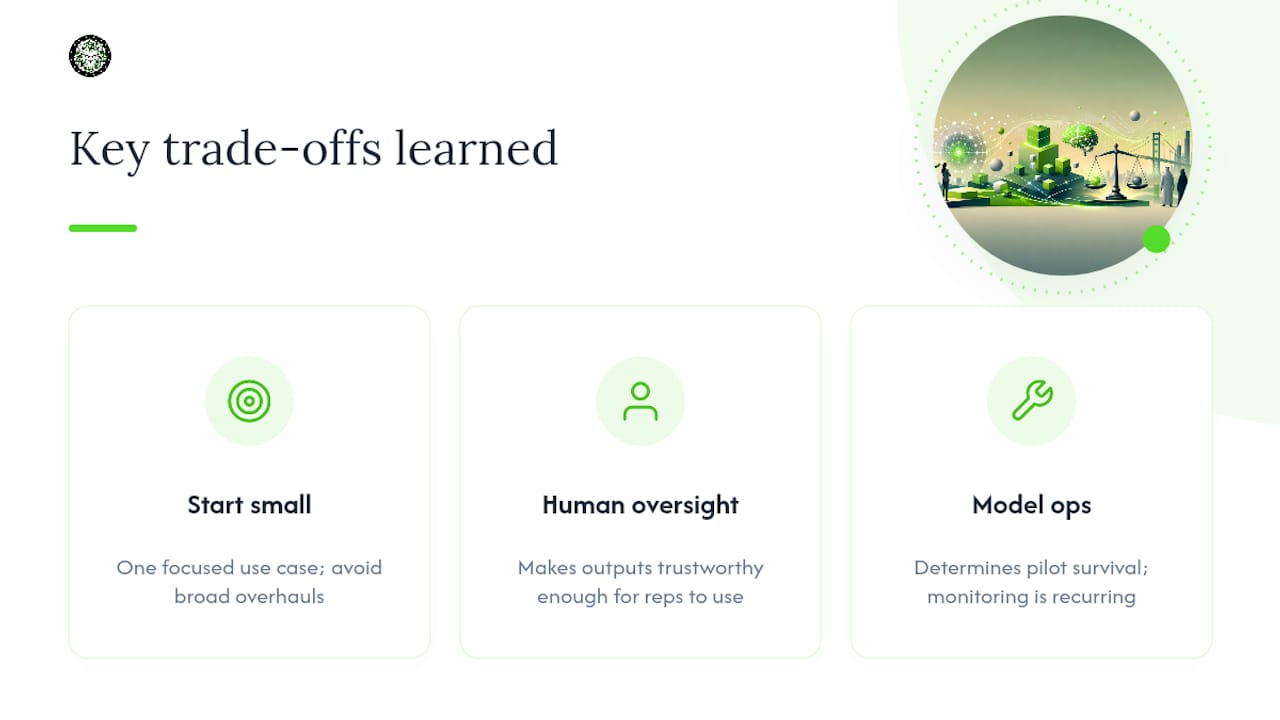
Three lessons repeat across nearly every AI CRM project worth its cost. First, start small. Teams that try to overhaul lead scoring, forecasting, and service automation simultaneously almost always lose the thread on measurement. Second, human oversight isn’t a limitation on AI, it’s what makes the output trustworthy enough for a rep to actually use it in front of a customer. Third, and most underestimated: model operations, not the initial feature set, determine whether a pilot survives past its first year.
On architecture, custom builds make sense when your data structure or workflow is genuinely unusual. Pre-built connectors work well when your CRM and use case are standard. Managed services fit teams without in-house AI operations capacity. None of these is universally right.
One budgeting note worth repeating to any finance stakeholder: ongoing monitoring and retraining are recurring costs, not a one-time line item you close out after launch.
— Amal
How Proud Lion Studios Can Help You Build This
Proud Lion Studios is the alternative to a generic AI vendor for CRM integration: instead of a templated add-on, you get a custom build around your actual data, workflows, and the specific outcomes you’re trying to hit. That means AI-powered CRM and ERP integration, agentic workflow design, and conversational AI built to route conversations into canonical CRM fields rather than isolated chat logs nobody can act on.
A discovery call with our team covers your current CRM setup, data readiness, and the single use case most likely to show measurable results within 90 days. From there, a typical pilot deliverable includes a scoped integration plan, a governance framework matched to your industry, and a working prototype your sales or service team can test before any enterprise-wide commitment. If your roadmap includes mobile or blockchain-based components alongside CRM AI, our mobile app development) team can scope that in the same conversation. We recommend reaching out to book a discovery call to get a concrete pilot plan, rather than a generic sales deck.
Sources
For deeper analysis, see Forrester on generative AI in CRM, IBM’s AI in CRM overview, Gartner’s agent adoption forecast, and the ScienceDirect study on AI-CRM capabilities.
Gartner press release: enterprise apps and task-specific AI agents
Multidimensional exploration of AI-powered CRM capabilities — ScienceDirect
FAQ
How Can AI Be Used in CRM?
AI can score and prioritize leads, forecast sales outcomes, summarize customer calls and emails, automate routing and follow-ups, and power chatbots that handle first-line service, all working from data already inside your CRM.
Which AI Is Best for CRM?
There’s no single best AI model. The right choice depends on whether you need an AI-native platform, a bolt-on feature set, or a custom integration; firms like Proud Lion Studios build the latter around your existing CRM and specific workflow needs.
Can I Create a CRM Using AI?
You can build a custom CRM with AI features embedded from the start, which often gives more flexibility than retrofitting AI onto an existing system, particularly if your data structure or workflows are non-standard.
Can AI Replace a CRM?
No. AI enhances what a CRM does with your customer data, but it needs that structured system underneath it. A CRM without AI still functions; AI without a CRM has no customer data to act on.